Battery issues can be frustrating. One common question arises: "Why won't my battery charger recognize a flat battery?" This situation can lead to confusion and concern. A charger failing to detect a flat battery may indicate deeper issues.
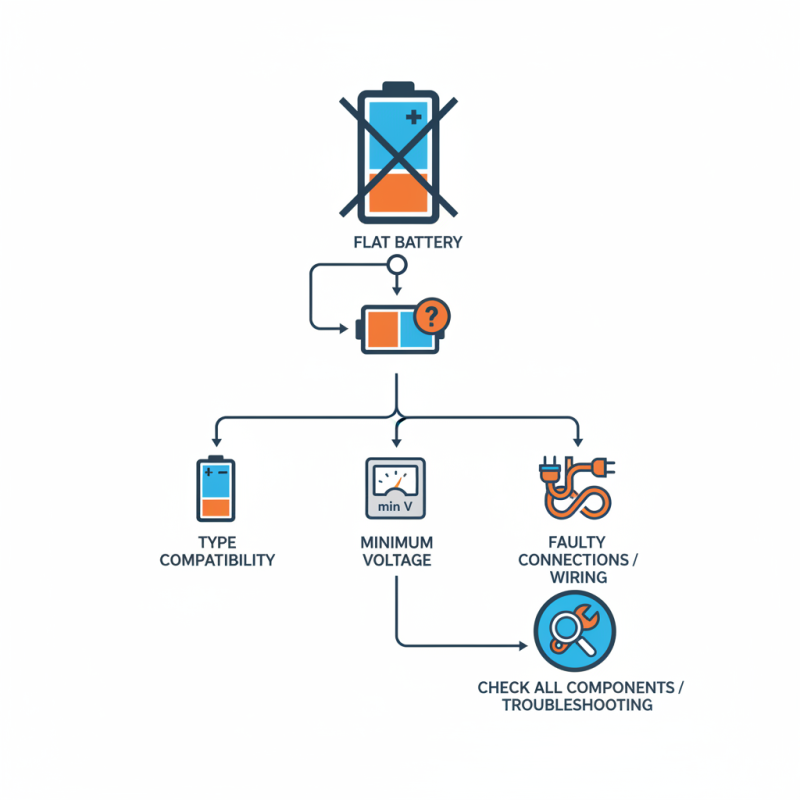
Several factors can influence this problem. For instance, the charger may be incompatible with the battery type. Some chargers require a minimum voltage level to operate effectively. A completely drained battery might not meet this threshold. Additionally, faulty connections or damaged wires can prevent proper communication between the charger and the battery.
Understanding these nuances is vital. It’s essential to check all components involved. Sometimes, an overlooked detail can be the culprit. If you find yourself asking, "Why won't my battery charger recognize a flat battery?" consider these factors. They can guide you toward troubleshooting and potentially resolving the issue.
Battery chemistry plays a crucial role in how chargers recognize and interact with batteries. Most typical rechargeable batteries, such as lithium-ion and lead-acid, can exhibit unique characteristics affecting their performance. For instance, in lithium-ion batteries, the minimum voltage level can lead to a situation called "deep discharge." This state makes the battery appear flat and often unresponsive to standard chargers.
Research indicates that around 20% of charger failures in recognizing batteries are due to the chemical state of the battery. When a battery is deeply discharged, its internal resistance increases, complicating the initial charging process. Chargers rely on detection algorithms that assess voltage levels. If a battery reports a dangerously low voltage, the charger may interpret it as a faulty or dead unit.
Additionally, temperature plays an essential role in battery chemistry. Batteries can malfunction at extreme temperatures, affecting voltage readings. A cold battery can struggle to operate as expected, leading to charging issues. Understanding these nuances can help users troubleshoot non-recognition problems and avoid misinterpretations by their charging devices.
When a battery charger fails to recognize a flat battery, several common issues may be at play. One primary reason could be corrosion on the battery terminals. Corrosion can obstruct the connection between the charger and the battery, preventing any charge from flowing. Even a small amount of rust or buildup can affect the charger's performance. Regularly checking and cleaning battery terminals can prevent this problem.
Another common issue is the state of the battery itself. If a battery is deeply discharged for too long, it may enter a state known as “deep discharge”, rendering it nearly impossible to charge. In these cases, a charger may fail to recognize the battery altogether. Users must be aware of their battery's health. A quick voltage test can provide insight into whether a battery is salvageable or needs replacement.
Lastly, the charger itself may be at fault. A malfunctioning charger might not deliver the necessary voltage or current to recognize a battery. It's essential to ensure that chargers are in good condition, as age and wear can affect functionality. Addressing these factors can significantly improve battery charging reliability.
Battery Management Systems (BMS) play a critical role in charging compatibility. These systems monitor and manage battery performance. They ensure safe operation and maintain battery health. When a battery is flat, the BMS can struggle to communicate effectively with the charger. This is often due to low voltage or damaged cells. If the BMS fails to recognize a battery, the charger will remain inactive.
Incompatible settings can cause issues too. For instance, the charger may require a minimum voltage to initiate charging. If the flat battery's voltage falls too low, the charger simply won’t engage. This situation emphasizes the importance of proper matching between chargers and batteries. A mismatched BMS may not allow the charger to function. Users should understand their battery specifications to avoid these pitfalls.
Sometimes, a software update can enhance compatibility. However, not all BMS updates are straightforward. Users might face challenges when attempting to update firmware. A poorly executed update can lead to further recognition issues. Tinkering with settings can result in confusion. Understanding how charging systems interact can save time and frustration. Always consult with professionals when in doubt.
This chart illustrates the charging compatibility of various battery management systems (BMS) with flat batteries based on their State of Charge (SoC) levels. As shown, different BMS types have varying efficiencies in recognizing and charging batteries at different SoC percentages.
A flat battery often poses a challenge for many users. One common issue is when chargers fail to recognize a flat battery. A central reason for this problem lies in voltage levels. Battery chargers are designed to detect specific voltage thresholds to initiate charging. When a battery is deeply discharged, its voltage can drop below this threshold. Consequently, the charger may not “see” the battery and thus refuse to begin charging.
Understanding voltage levels is crucial for effective charging. For instance, if a battery's voltage is beneath the minimum required level, the charger is unable to recognize it. This situation is especially common in lead-acid batteries. These batteries can be sensitive to low voltage. If yours is not charging, check if its voltage is excessively low.
Here are some tips to troubleshoot this issue:
A battery charger may fail to recognize a flat battery for several reasons. One common issue is a dirty or corroded connection. Inspect the terminals of both the charger and battery. Ensure they are clean and free of any corrosion. This simple check can often resolve recognition issues. A weak or damaged cable can also prevent proper charging. Look for any frays or breaks.
Another possibility is the battery's age. Over time, batteries lose their ability to hold a charge. If your battery is old, it may no longer be able to respond to a charger at all. Testing the battery with a multimeter provides valuable information about its health. A normal reading should be around 12.6 volts when fully charged. If the voltage is much lower, the battery may need replacement.
Lastly, ensure that your charger works correctly. Test it with another battery. If it can recognize a different one, the issue lies with the first battery. If not, the charger may be malfunctioning. These steps are essential for pinpointing problems with either the charger or battery. The right approach saves time and money in the long run.
: Generic chargers may fail to detect a flat battery due to low voltage levels.
Inspect the terminals for dirt or corrosion. Clean them to improve connections.
If the battery voltage drops below a certain level, the charger won't identify it.
Yes, older batteries often struggle to hold a charge. They may not respond to chargers anymore.
Use a multimeter to measure the voltage. It should be about 12.6 volts when fully charged.
First, check if the voltage is too low. Then, consider a manual jump-start from another battery.
Not necessarily. Poor updates may create additional recognition problems.
No, a damaged cable can cause issues. Inspect for frays or breaks before using it.
Regularly monitor your battery's health and voltage levels. Prevention is key to avoiding problems.
Test the charger with a different battery. If it fails again, the charger may be faulty.
In the exploration of the question, "Why won't my battery charger recognize a flat battery?", it's essential to understand the underlying battery chemistry and its significant role in charging recognition. A flat battery often exhibits voltage levels that can confuse chargers, leading to failures in recognizing the battery. Common reasons for these failures include incompatible charger specifications, damaged cables, or faults within the battery itself.
Furthermore, the function of Battery Management Systems (BMS) is crucial in ensuring compatibility between the charger and the battery. These systems monitor the battery status and help in accurate power delivery, thereby preventing potential issues. To troubleshoot such recognition problems, users can follow systematic steps to identify whether the issue lies with the charger or the battery. Ultimately, understanding these components can aid in effectively addressing charging issues and ensuring optimal performance.

E-Tronde Charger