How to Fix a Charger Outputting Lower Voltage Than Labeled

Time:2026-10-05 Author:Mason
0%

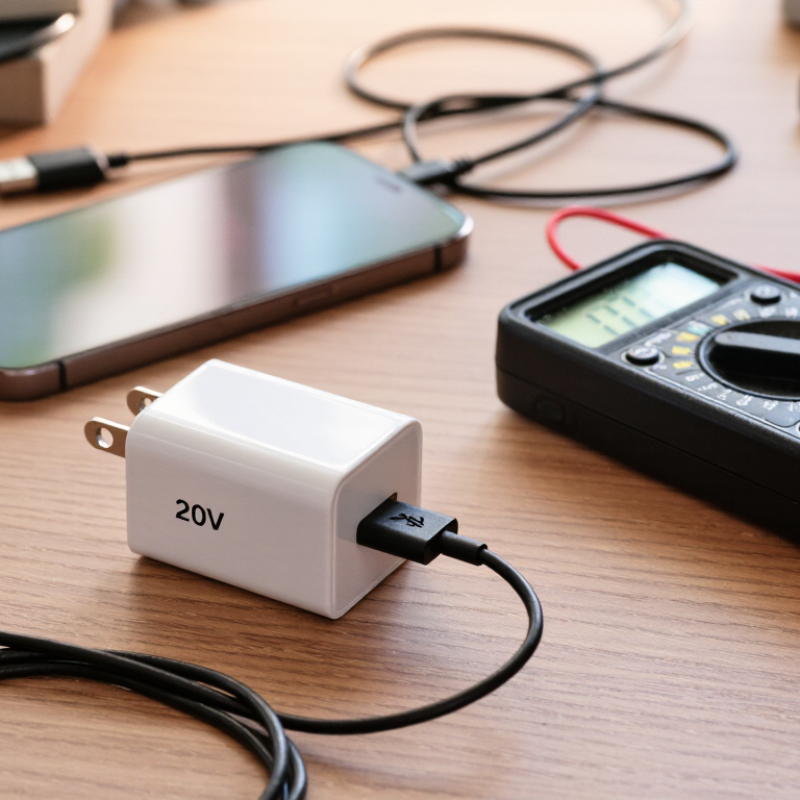
A charger marked “20V” may not always show 20 volts on a multimeter. The reading can change with load, cable resistance, battery condition, and charging protocols. This often confuses users who expect a fixed number.

Why is my charger outputting lower voltage than labeled? The answer depends on the charger type and testing method. USB-C Power Delivery chargers may begin at 5V, then increase voltage after device negotiation. Some adapters also regulate their output only when connected to a suitable device. An unloaded measurement can therefore be misleading.

The cable matters too. A thin, damaged, or unusually long cable can create a noticeable voltage drop, especially during high-current charging. Loose connectors may cause brief fluctuations. I have seen readings change when the plug was moved slightly. That detail should not be ignored.

Use a reliable multimeter and compare readings under normal charging conditions. Check the adapter label, cable rating, device requirements, and manufacturer guidance. If possible, test with another certified cable and compatible device. Do not assume every low reading means the charger has failed.

Safety comes first. Stop using the adapter if it becomes unusually hot, smells burnt, sparks, or shows physical damage. A professional technician can inspect unstable output more safely than repeated trial and error. Some measurements may still be imperfect, especially with fast-charging systems. The goal is not simply to reach the printed voltage. It is to confirm stable, compatible, and safe power delivery.
How to Fix a Charger Outputting Lower Voltage Than Labeled

Understanding Why a Charger May Deliver Lower Voltage

A charger can deliver lower voltage than its label for several normal reasons. The printed value is often a nominal rating, not a guaranteed reading in every situation. Many chargers begin at a basic voltage and increase output only after the connected device requests it. Without that communication, the charger may remain at the lower level.

Load conditions also matter. When a device draws substantial current, resistance inside the cable and connectors can reduce the voltage at the device. Thin, long cables show this effect more clearly. Heat can increase resistance too. I once measured a charger at its plug and found a reasonable reading, but the device received less after passing through a damaged cable. That small detail was easy to miss. Measure both ends under load with a reliable multimeter, and check whether the meter itself is accurate.

A reading that falls slightly below the label may be acceptable, especially during heavy use. A large drop, unstable output, buzzing sound, burning smell, or excessive heat needs attention. Try a shorter cable and clean, undamaged connectors. Check the charger’s output profile against the device’s requirements. Some readings can also be misleading when the charger has no connected load. Do not open the charger; internal parts may retain dangerous energy. If testing remains confusing, ask a qualified technician to inspect it. My earlier assumption that every labeled voltage should appear immediately was too simple. Ones and zeros do not explain everything.

Checking the Charger, Cable, and Power Source

How to Fix a Charger Outputting Lower Voltage Than Labeled

A charger’s printed voltage is usually its expected output, not a constant promise. Under load, the reading may drop slightly. Some devices also request different voltage levels through a charging protocol. Use a reliable USB power meter while the device is connected. Compare the idle reading with the loaded reading. A large drop suggests a weak charger, poor contact, or internal failure. Do not open the charger. Damaged mains equipment can remain dangerous after unplugging.

Check the cable carefully. Thin conductors, bent plugs, and loose connectors increase resistance. Feel for unusual warmth near either connector, but do not continue testing a visibly damaged cable. Try a short, certified cable with secure plugs. Then test the charger from another wall outlet. Avoid loose extension connections and overloaded power strips. If the voltage improves, the original power source may be unstable. I have sometimes blamed the charger too quickly; the outlet or cable was the real fault.

Tips: Test one change at a time. Record the voltage before and during charging. Clean, dry contacts matter. If a compatible charger still reads far below its label, stop using it and replace it with an equivalent safety-rated unit. A fluctuating reading deserves attention. Don’t ignore heat, buzzing, smell, or repeated charging interruptions. When measurements disagree, a qualified technician can verify the charger with calibrated equipment.

Measuring Output Voltage Safely and Accurately

How to Fix a Charger Outputting Lower Voltage Than Labeled

A charger’s labeled voltage is often a nominal value, not a constant reading. Measure it before assuming the charger has failed. Use a quality digital multimeter set to DC voltage. Select a range above the charger’s expected output. Place the black probe on the negative contact and the red probe on the positive contact. Never allow the probe tips to touch each other. A brief short circuit can damage the charger or meter. Some chargers show their rated voltage only after detecting a connected device. USB-C power supplies may also negotiate different voltage levels. I have seen readings change when the cable was bent, which exposed a weak connection.

Tips: Measure twice, using a stable surface and dry hands. Test the charger without a load, then test it with a suitable load tester. Record both readings. A small drop may be normal under load, but a large drop suggests resistance, damage, or poor regulation. Do not open a mains-powered charger. Internal capacitors can remain dangerous after unplugging.

Check the cable, connector, and device socket for dirt or looseness. Compare results with a known-good cable of the same rating. If voltage falls sharply during testing, stop using the charger. The label may describe maximum output rather than everyday performance. This detail is easy to miss. A careful measurement can prevent replacing a safe charger unnecessarily, but uncertain readings deserve professional inspection.

Identifying Faulty Components and Compatibility Issues

A charger showing lower voltage than its label may have a failed cable, damaged connector, weak capacitor, or overheated switching component. Measure it with a reliable multimeter under load, not only while disconnected. A no-load reading can look normal. Voltage may collapse when a phone or laptop demands current. Inspect for bent contacts, loose plugs, darkened plastic, or a sharp electrical smell. Stop testing damaged equipment.

Compatibility is often misunderstood. A USB-C charger does not always deliver its highest labeled voltage automatically. The device and charger must negotiate a supported power profile. The USB Implementers Forum explains that USB Power Delivery can provide several voltage levels, but only after communication between compatible equipment. A mismatched cable may also limit current. Check the device’s required voltage, current, polarity, connector type, and charging protocol. A lower reading may be intentional protection, not a defective supply. My first diagnosis is often wrong.

Tips: Test with a known-good, correctly rated cable and load. Compare the output at the charger and at the device end. The U.S. Department of Energy’s external power-supply rules include no-load limits as low as 0.1 watt for many low-power units. Excessive standby consumption can indicate aging components. Do not open a sealed charger unless you are trained; capacitors may retain dangerous energy. Record readings at idle and during charging. A five-minute test can reveal more than a label.

Repairing or Replacing the Charger Based on Test Results

A charger showing lower voltage needs a controlled test, not an immediate replacement. Measure it without a load, then repeat with a suitable load tester. A 5V unit reading 4.6V under load deserves attention. Check the cable, connector, polarity, and voltage ripple if an oscilloscope is available. Digital meters can hide brief voltage drops.

Repair only when the fault is clearly external, such as a damaged cable or loose plug. A sealed switching charger with overheating, buzzing, burnt odor, cracked insulation, or unstable output should be replaced. Opening it can expose dangerous stored energy. The U.S. Department of Energy’s external power supply requirements address active-mode efficiency and no-load consumption. The International Energy Agency has estimated standby power at roughly 5–10% of household electricity use in many markets. Efficiency matters, but stable output matters more.

Tips: Compare readings at zero load and rated load. Record temperature after 20 minutes. If voltage falls sharply, stop testing. IEC 62368-1 emphasizes abnormal-operation and temperature-rise testing, so heat is meaningful evidence. One imperfect test can mislead. A cheap meter, poor contact, or unsuitable load may create a false failure. When results remain uncertain, replacing the charger with a correctly rated, safety-certified unit is usually the more reliable decision.

FAQS

Why can a charger show lower voltage than its label?

The label may show nominal or maximum output, not a constant reading. A small drop under load can be normal. My first diagnosis may be wrong.

How should I measure charger voltage safely?

Set a reliable digital multimeter to DC voltage. Choose a range above the expected output. Place the black probe on negative and the red probe on positive.

What should I avoid during measurement?

Keep the probe tips apart. A brief short circuit can damage the charger or meter. Use dry hands and a stable table.

Why does the voltage change when a device is connected?

Some chargers adjust voltage after detecting a compatible device. A disconnected reading may look normal. Test both without load and during charging.

How can I test whether the cable causes the voltage drop?

Inspect the cable for bends, loose plugs, or damaged insulation. Compare it with a known-good cable of the same rating. Test at both ends.

What signs suggest a charger is physically damaged?

Look for bent contacts, loose connectors, darkened plastic, or a sharp electrical smell. Stop testing damaged equipment. Do not ignore unusual heat.

Can a lower voltage be caused by incompatibility?

Yes. The charger, cable, and device must support matching voltage, current, connector, and charging requirements. A lower level may be intentional protection.

When should I replace or professionally inspect the charger?

Stop using it if voltage falls sharply under load. Professional inspection is safer when readings remain uncertain. Never open a mains-powered charger; internal capacitors may retain dangerous energy. Five minutes of testing can reveal more than the label.

Conclusion

If you are wondering, “Why is my charger outputting lower voltage than labeled,” the cause may be a damaged cable, a weak power source, loose connectors, overheating, or normal voltage behavior under load. First, inspect the charger and cable for cuts, bent pins, unusual heat, or signs of wear. Try a different wall outlet and, if possible, a compatible cable to determine whether the problem follows the charger or another component.

To measure the output safely, use a reliable multimeter and follow its instructions carefully, avoiding exposed contacts and short circuits. Compare the measured voltage with the value printed on the charger, while remembering that some chargers adjust their output depending on the connected device. If the voltage remains unusually low, the adapter may have an internal fault or may not be compatible with the device’s required voltage and power. Do not open or attempt to repair a sealed charger unless you are qualified; replacing it with a properly rated, compatible unit is usually the safest solution.

Mason

Mason

Mason is a seasoned marketing professional with a deep expertise in the company's offerings and a passion for driving brand awareness. With a strong background in digital marketing strategies, he has an innate ability to connect with diverse audiences and effectively communicate product benefits.......